Showing posts with label Designer Items. Show all posts

Thursday, 31 January 2019

Emblems

One of the new designer features in New Style Boutique 3: Styling Star is emblems which can be added to items you design or shopping bags. The game allows players to pick from default emblems included in the game, scan in special Nintendo themed emblems via compatible amiibos or even design their own unique emblems.


Example of the Yoshi Egg emblem added to a t-shirt design

Emblems can be found under the Design option at the Apartment and only three emblems can be used at a time. Three emblems will be displayed on the screen and you can select which one you would like to use on your shopping bags by selecting the Confirm option. To edit an emblem, select the Edit option and the game will ask if you are sure that you wish to edit this emblem. Select Yes and you will be brought to the edit screen.


The emblem edit screen is similar to the design feature in other Nintendo games such as Animal Crossing New Leaf. There are a variety of colour palettes to use with your design as well as various pen, shape and fill options. You can turn on and off a grid to assist with your design and there is an undo and zoom buttons. Select the emblem shield icon on the left hand side of the bottom 3DS screen to change the emblem design. All the emblems you have available to use will appear and their unique colour palettes will appear on the design screen when you select them. You can choose an emblem from ones available or design your own. Select the OK button once you are happy with your design and it will save it to the three available emblems.


Emblem design screen

Emblems can be used on various designer items as an small detail and add a unique touch to designs. The emblem you have selected from the three available on the main emblems screen will appear on the shopping bags of your boutique if you choose that design option. To alter this, you can do that through the Shopping Bag option and add it as part of the design.

The game includes 18 default emblems which feature a variety of designs. The default emblems feature cute animals, decorate designs and the NIN10 Logo. There is an additional 10 emblems available to unlock if you scan in compatible amiibos into Styling Star. Here are the default emblems that you get:


Monday, 17 December 2018

Amiibo - Ribbon Tote Bag & Style Boutique Emblem

Style Boutique 3 has amiibo compatibility and unlocks special designs for your character to wear. In this game, amiibos unlock emblems and design items that are unique to the amiibo character. Certain amiibo figures unlock certain content and this guide will look at the Ribbon Tote Bag and the Style Boutique Emblem which can be unlocked with any Nintendo amiibo that is not associated with the character/series specific amiibo designs.

Example of the Ribbon Tote Bag - Polka Dot Ribbon design coloured

To scan an amiibo into the game, open the phone menu and select the amiibo app. Make sure that you have the internet/online switched on. You will need either a New Nintendo 3DS/2DS with the built in NFC reader or a separate NFC Reader from Nintendo. Turn the NFC reader on if you are using the stand-alone one. Place the amiibo on the 3DS or NFC reader and the game will ask to scan it in. Once you have successfully scanned the amiibo into the game, you can either close the amiibo app or scan in more amiibos. Go to your apartment and select the Design option to access the content unlocked by the amiibo.

The Ribbon Tote bag and Style Boutique emblem will unlock if you scan any Nintendo amiibo that is not associated with the character/series specific amiibo designs. For example, the Mario series amiibos unlock the Mario content. This means the Mario amiibos will only unlock those designs and emblems. If you scan in a Pikachu or Zero Suit Samus amiibo, they will unlock the Ribbon Tote Bag and emblem as they are not linked to a character specific item. This means that all amiibos from Nintendo are compatible with the game. Scanning the amiibo will unlock the Style Boutique emblem which features the famous shoe logo from the game series. You can add this emblem to various design items or to shopping bags.


Style Boutique Shoe Emblem

The Ribbon Tote Bag features three designs: Simple Ribbon, Lace Ribbon and Polka Dot Ribbon. Select the bag option from the design menu and you will see the base Ribbon Tote bag. Select this and the three options for the bag design will appear. You can recolour the bag and emblem designs to any colour using the design feature. 

Simple Ribbon bag design

Lace Ribbon bag design

Monday, 3 December 2018

Amiibo - Luigi

Style Boutique 3 has amiibo compatibility and unlocks special designs for your character to wear. In this game, amiibos unlock emblems and design items that are unique to the amiibo character. Certain amiibo figures unlock certain content and this guide will look at the content unlocked with any Luigi series amiibo.

Example of the Luigi Bag - Brick design coloured

To scan an amiibo into the game, open the phone menu and select the amiibo app. Make sure that you have the internet/online switched on. You will need either a New Nintendo 3DS/2DS with the built in NFC reader or a separate NFC Reader from Nintendo. Turn the NFC reader on if you are using the stand-alone one. Place the amiibo on the 3DS or NFC reader and the game will ask to scan it in. Once you have successfully scanned the amiibo into the game, you can either close the amiibo app or scan in more amiibos. Go to your apartment and select the Design option to access the content unlocked by the amiibo.

The Luigi amiibo's unlock a Luigi emblem and two Luigi bag designs. The emblem features the symbol of Luigi's face and details his famous green hat and moustache. You can add this emblem to various design items or to shopping bags.


Luigi Emblem

The Luigi bag features two designs: Luigi plain and Luigi Brick. Select the bag option from the design menu and you will see the base Luigi bag. Select this and the two options for the bag design will appear. You can recolour the bag and emblem designs to any colour using the design feature. 

Luigi Plain bag design

Monday, 12 November 2018

Amiibo - Yoshi

Style Boutique 3 has amiibo compatibility and unlocks special designs for your character to wear. In this game, amiibos unlock emblems and design items that are unique to the amiibo character. Certain amiibo figures unlock certain content and this guide will look at the content unlocked with any Yoshi series amiibo.


Example of the Yoshi - Egg t-shirt design coloured 

To scan an amiibo into the game, open the phone menu and select the amiibo app. Make sure that you have the internet/online switched on. You will need either a New Nintendo 3DS/2DS with the built in NFC reader or a separate NFC Reader from Nintendo. Turn the NFC reader on if you are using the stand-alone one. Place the amiibo on the 3DS or NFC reader and the game will ask to scan it in. Once you have successfully scanned the amiibo into the game, you can either close the amiibo app or scan in more amiibos. Go to your apartment and select the Design option to access the content unlocked by the amiibo.

The Yoshi amiibo's unlock a Yoshi Egg emblem and three Yoshi t-shirt designs. The emblem features a green egg and a pink egg that Yoshi's will appear from in various Nintendo games. You can add this emblem to various design items or to shopping bags.


Yoshi Egg emblem

The Yoshi t-shirt features three designs: Yoshi Simple, Yoshi Egg and Yoshi Spots. Select the T-shirt option from the design menu and you will see the base Yoshi t-shirt. Select this and the three options for the t-shirt design will appear. You can recolour the t-shirt and emblem designs to any colour using the design feature. 


Yoshi Simple T-Shirt Design

Monday, 5 November 2018

Designer Items

The clothing design feature has returned in New Style Boutique 3: Styling Star and teh game features a variety of clothing items which you can add your own design to. In Styling Star, the Designer Lounge has been removed so you no longer need to unlock designs and patterns. The design feature can now be found in your Apartment and items you create can be uploaded to the Design Centre (more information can be found in this guide). Nearly all the clothing items will be available straight away when you unlock the Design option and the Stage Costumes will become available near the end of the main story line. The only unlockable designs are the ones that can be obtained from scanning in compatible amiibos into the game.

To start off, select the Design option when in your Apartment. A few options will appear to design items and emblems, but this guide will look at clothing items. Select the Create Item button to bring up the item selection screen. The types of clothing items you can design in Styling Star has been cut down from the large variety that featured in Fashion Forward. A number of patterns have also been removed and only a select few are now available. The clothing items that you can design in Styling Star include:
  • Stage Costume
  • T-Shirt (Inner)
  • Shoes
  • Bag
  • Dresses

With each clothing item, you can customise the colour and pattern of the item. Some patterns will allow for more customisation than others with five colours being the highest amount you can alter for an item (i.e. stage costumes have five colour options). Here are pictures of all the clothing items you can design in the game along with the patterns available for each item.

Stage Costumes
There are three stage costumes available and these unlock during the main story line. Ethan will request that you design stage costumes to match Alina, Rosie and Yolanda's personalities. This clothing item is available in the following patterns: Plain, Stripes, Dots, Diamonds and Hearts.
  • Stage Costume - Rosie
  • Stage Costume - Yolanda
  • Stage Costume - Alina


Stage Costume - Rosie

Stage Costume - Yolanda

Stage Costume - Alina

T-Shirt (Inner) 
This clothing item is available in the following patterns: Plain, Horizontal Stripes, Animal and Flowers. Amiibo exclusive items and prints are also available.

Plain T-Shirt

Raglan T-Shirt 

Sweetheart T-Shirt

Splatoon T-Shirt (Amiibo Item)

Monday, 22 October 2018

Amiibo - 30th Anniversary Mario

Style Boutique 3 has amiibo compatibility and unlocks special designs for your character to wear. In this game, amiibos unlock emblems and design items that are unique to the amiibo character. Certain amiibo figures unlock certain content and this guide will look at the content unlocked with the 30th Anniversary Mario amiibos.

To scan an amiibo into the game, open the phone menu and select the amiibo app. Make sure that you have the internet/online switched on. You will need either a New Nintendo 3DS/2DS with the built in NFC reader or a separate NFC Reader from Nintendo. Turn the NFC reader on if you are using the stand-alone one. Place the amiibo on the 3DS or NFC reader and the game will ask to scan it in. Once you have successfully scanned the amiibo into the game, you can either close the amiibo app or scan in more amiibos. Go to your apartment and select the Design option to access the content unlocked by the amiibo.

There are special pixel themed Mario items that you can unlock with the 30th Anniversary Mario amiibos. Both the Classic and Modern amiibos will unlock a pixel Mario emblem and three tote bag designs. The emblem features the classic pixel rendition of Mario which can be found in the older Mario games. You can add this emblem to various design items or to shopping bags.


Pixel Mario Emblem

The Pixel Mario Bag features three designs: Pixel Mario Star, Pixel Mario Plain and Pixel Mario Item. Select the bag option from the design menu and you will see the base Pixel Mario bag. Select this and the three options for the bag design will appear. You can recolour the bag and emblem designs to any colour using the design feature. 

Pixel Mario Star design

Pixel Mario Plain design

Pixel Mario Item design

The following amiibo's are compatible with Style Boutique 3/Style Savvy 4 and will unlock the Pixel Mario bag designs and emblem. 
  • 30th Anniversary Mario - Classic Colour
  • 30th Anniversary Mario - Modern Colour


Example of the Pixel Mario - Star bag design coloured

Tuesday, 31 July 2018

Amiibo - Animal Crossing

Style Boutique 3 has amiibo compatibility and unlocks special designs for your character to wear. In this game, amiibos unlock emblems and design items that are unique to the amiibo character. Certain amiibo figures unlock certain content and this guide will look at the content unlocked with any Animal Crossing series amiibo and amiibo cards.


Example of the Animal Crossing - Village Sky t-shirt design coloured

To scan an amiibo into the game, open the phone menu and select the amiibo app. Make sure that you have the internet/online switched on. You will need either a New Nintendo 3DS/2DS with the built in NFC reader or a separate NFC Reader from Nintendo. Turn the NFC reader on if you are using the stand-alone one. Place the amiibo on the 3DS or NFC reader and the game will ask to scan it in. Once you have successfully scanned the amiibo into the game, you can either close the amiibo app or scan in more amiibos. Go to your apartment and select the Design option to access the content unlocked by the amiibo.

The Animal Crossing amiibo's unlock a leaf emblem and three Animal Crossing t-shirt designs. The emblem features the leaf icon from the game series which appears on a variety of occasions such as items or game box art. You can add this emblem to various design items or to shopping bags.


Animal Crossing Leaf Emblem

The Animal Crossing t-shirt features three designs: Village Street, Village Sky and Village Leaf. Select the T-shirt option from the design menu and you will see the base Animal Crossing t-shirt. Select this and the three options for the t-shirt design will appear. You can recolour the t-shirt and emblem designs to any colour using the design feature. 


Village Street t-shirt design

Saturday, 14 July 2018

Amiibo - Princess Peach

Style Boutique 3 has amiibo compatibility and unlocks special designs for your character to wear. In this game, amiibos unlock emblems and design items that are unique to the amiibo character. Certain amiibo figures unlock certain content and this guide will look at the content unlocked with the Princess Peach amiibo.


Example of the Princess Peach Simple T-Shirt design with colour.

To scan an amiibo into the game, open the phone menu and select the amiibo app. Make sure that you have the internet/online switched on. You will need either a New Nintendo 3DS/2DS with the built in NFC reader or a separate NFC Reader from Nintendo. Turn the NFC reader on if you are using the stand-alone one. Place the amiibo on the 3DS or NFC reader and the game will ask to scan it in. Once you have successfully scanned the amiibo into the game, you can either close the amiibo app or scan in more amiibos. Go to your apartment and select the Design option to access the content unlocked by the amiibo.

The Princess Peach amiibo unlocks a crown emblem and three Peach t-shirt designs. The emblem features Princess Peach's famous crown from the game series. You can add this emblem to various design items or to shopping bags.


Princess Peach emblem.

The Peach t-shirt features three designs: Peach Simple, Peach Frill and Peach Corset. Select the T-shirt option from the design menu and you will see the base Peach t-shirt. Select this and the three options for the t-shirt design will appear. You can recolour the t-shirt and emblem designs to any colour using the design feature. 

Friday, 22 June 2018

Design Centre

Style Boutique 3 has an excellent new feature that allows players to post their clothing designs online for other players to download. This feature is called Design Centre and provides access to a variety of looks designed by players in your region.


The Design Centre is region-locked the same way Shopdo is meaning you can only search and download items uploaded by players in the same region as you. If you search for a Shopdo Owner ID of a player in a different region to you, the game will display 'Not Found' after searching. The following points detail what content you can access in regards to the region your game is:
  • Style Boutique: Styling Star = Can only access Shopdo & Owner ID's from other players in the EUR/AUS region who are playing Style Boutique. Cannot access Style Savvy or Girls Mode players.
  • Style Savvy: Styling Star = Can only access Shopdo & Owner ID's from other players in the NA region who are playing Style Savvy. Cannot access Style Boutique or Girls Mode players.
  • Girls Mode 4: スター☆スタイリスト (Star☆Stylist) = Can only access Shopdo & Owner ID's from other players in the JPN region who are playing Girls Mode. Cannot access Style Boutique or Style Savvy players.

Design Centre can be accessed via the phone menu and requires an internet connection to use. When you select the Design Centre app, the game will inform you that your items, profile and Owner ID will be made public to other players. Your profile card can be edited via the Contacts App and displays basic information about your character. When enter the Design Centre app, there are a number of options available: 
  • Recent
  • Popular Pieces
  • Just For You
  • Favourites
  • Enter Owner ID
  • Enter Item ID
  • Search Criteria
  • Post Item
  • My Page


Design Centre Menu Screen.

Recent
Select this item to see items that were recently uploaded to Design Centre by players. It will show you items that have been uploaded to the Design Centre database by anyone in your region. Often you'll see the same person posting multiple times if they uploaded a lot of items at once. Each item will have the number of items included in the set listed as well as a price.

If you are interested in purchasing an item on the Design Centre, select the item/set and select Buy. The game will save after you purchase an item and all items are payed for using your in-game money. You can find items you have downloaded in your wardrobe at the apartment or a complete list of all the items brought can be found in the Design Scrapbook under the Design option at the apartment. You can also delete items from here.

Popular Pieces
Showcases items that have been downloaded many times on the Design Centre. I've rarely seen this section change for months in the Style Boutique region. Items here have high download numbers and low prices that make them so popular.


Popular Pieces on the Design Centre.

Just For You
This option will bring up items that are similar to ones you have uploaded yourself or downloaded previously. It may show you similar ones to items you have posted, for example I saw a dress similar to one I posted.

Favourites
Items from players you have added to your favourites in Shopdo will appear here. Select this option and a list of your favourited players will appear. Select a player to see if they have posted an item to the Design Centre.

Enter Owner ID
You can search for players using their Owner ID if you know it from Shopdo. This is a great way to look at designs from players you follow on social media or have seen on Shopdo. The game will display all the items that the player has posted to the Design Centre. Please note you can only look up players from the same region as you.

Thursday, 26 April 2018

Amiibo - Legend Of Zelda Series

Style Boutique 3 has amiibo compatibility and unlocks special designs for your character to wear. In this game, amiibos unlock emblems and design items that are unique to the amiibo character. Certain amiibo figures unlock certain content and this guide will look at the content unlocked with the Legend Of Zelda series amiibo.


Any Legend Of Zelda series amiibo will unlock this T-shirt design.

To scan an amiibo into the game, open the phone menu and select the amiibo app. Make sure that you have the internet/online switched on. You will need either a New Nintendo 3DS/2DS with the built in NFC reader or a separate NFC Reader from Nintendo. Turn the NFC reader on if you are using the stand-alone one. Place the amiibo on the 3DS or NFC reader and the game will ask to scan it in. Once you have successfully scanned the amiibo into the game, you can either close the amiibo app or scan in more amiibos. Go to your apartment and select the Design option to access the content unlocked by the amiibo.

The Legend Of Zelda series amiibo unlocks a special triforce emblem and one Legend Of Zelda t-shirt designs. The emblem features the famous triforce from the game series. You can add this emblem to various design items or to shopping bags.


Triforce Emblem.

The Legend Of Zelda t-shirt features only one design. Select the T-shirt option from the design menu and you will see the base Legend Of Zelda t-shirt. Select this and the one option for the t-shirt design will appear. The amiibo unlocks the Legend Of Zelda Simple design. You can recolour the t-shirt and emblem designs to any colour using the design feature. 


The following amiibo's are compatible with Style Boutique 3/Style Savvy 4 and will unlock the Legend Of Zelda t-shirt and emblem. Any amiibo's from characters in the Legend Of Zelda series (including Breath Of The Wild) will unlock the content as will the Super Smash amiibos of the Legend Of Zelda series characters. The following amiibo's will unlock the Legend Of Zelda T-Shirt and emblem:
  • Link (All versions of his amiibo)
  • Toon Link
  • Zelda
  • Sheik
  • Ganondorf
  • Guardian
  • Bokoblin
  • Daruk
  • Urbosa
  • Mipha
  • Revali

Example of the Legend Of Zelda Simple T-Shirt design with colour.

Wednesday, 21 March 2018

Tips For Making Money

It can be a bit tricky to earn money in Styling Star as there aren't too many methods that will earn money fast. Fast money making methods from the previous game Fashion Forward  were removed in the new game such as rent money from the Caprice Chalet and Designer Lounge commission requests. However there are still some useful methods you can use in Styling Star to earn money.

The best trick to earn money is the utilise the messenger system in the phone menu and invite Chic image customers to your boutique. These types of customers will have large budgets such as $10,000 or $30,000 and will spend the largest amount of money at the boutique out of all the styles/images. The picture below shows how I made $32,155 in one day by only serving three chic customers.


Here are the steps you can follow to make quick and easy cash in Styling Star:


Step 1
Stock up on items from Enid Chen and ARIANNA. Ensure you purchase the most expensive items from the brands as you will make a large profit back from selling them. Sales are a excellent time to stock up on items and make sure to use the restock app from the phone menu. The ideal items you should stock up on include:
  • Diamond Watch
  • Elegant Boston Bag
  • Stylish Shopper Bag
  • Pattern Drawstring Bag
  • Crystal Collar Necklace
  • Jewelled Fringe Necklace
  • Jewelled Choker
  • Jewelled Chandelier Earrings
  • Thigh High Boots
  • Quilted Knee Boots
  • Organdie Ribbon Dress
  • Faux-Fur Robe
  • Leopard Print Faux Fur Coat


Step 2
Open the messaging app and invite Chic customers to come to the boutique for a new outfit. You can invite three customers per day and you must have a decent amount of hearts with them to invite them to the boutique. You can check if a customer likes the chic image by checking their details for their favourite image. Here are examples of customers you can invite that love the chic image:
  • Alexis
  • Angelique
  • April
  • Carmen
  • Cerise
  • Gillian Grace
  • Heather
  • Jamie-Lee
  • Kiki Summers
  • Lily
  • Lorelei
  • Lorina
  • Martine
  • Matilda
  • Mikiko
  • Nadia
  • Nicolette
  • Petra
  • Portia
  • Sybil
  • Tammy
  • Vicky

Step 3
Head over to the boutique at the time you stated for the customer to visit. Talk to them and they will ask for an outfit that you think suits them. When the selection screen appears, you will notice their budget is quite large. Open the search menu and select the following criteria: Enid Chen, ARIANNA, Chic, $300+ Price. Now select an outfit for them from items that belong to those search categories. Follow these handy tips when creating an outfit:

Thursday, 15 March 2018

Amiibo - Kirby

Style Boutique 3 has amiibo compatibility and unlocks special designs for your character to wear. In this game, amiibos unlock emblems and design items that are unique to the amiibo character. Certain amiibo figures unlock certain content and this guide will look at the content unlocked with the Kirby series amiibo.


The Kirby amiibo will unlock this T-shirt design.

To scan an amiibo into the game, open the phone menu and select the amiibo app. Make sure that you have the internet/online switched on. You will need either a New Nintendo 3DS/2DS with the built in NFC reader or a separate NFC Reader from Nintendo. Turn the NFC reader on if you are using the stand-alone one. Place the amiibo on the 3DS or NFC reader and the game will ask to scan it in. Once you have successfully scanned the amiibo into the game, you can either close the amiibo app or scan in more amiibos. Go to your apartment and select the Design option to access the content unlocked by the amiibo.

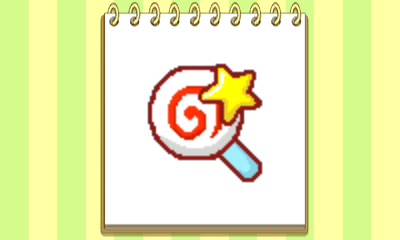
The Kirby amiibo unlocks a special Kirby themed emblem and three Kirby themed t-shirt designs. The emblem features a design of a cute piece of candy and a little star from the game series. You can add these emblem to various design items or to shopping bags.


Kirby Emblem.

The Kirby t-shirt features three unique designs. Select the T-shirt option from the design menu and you will see the base Kirby t-shirt. Select this and the three options for the t-shirt design will appear. The amiibo unlocks the Kirby Simple, Kirby 1-Up and Kirby Star designs. You can recolour the t-shirt and emblem designs to any colour using the design feature. 


Kirby Simple T-Shirt Design

Kirby 1-Up T-Shirt Design

Kirby Star T-Shirt Design

The following amiibo's are compatible with Style Boutique 3/Style Savvy 4 and will unlock the Kirby t-shirts and emblem. Any amiibo's from characters in the Kirby series will unlock the content as will the Super Smash amiibos of the Kirby series characters. The following amiibo's will unlock the Kirby T-Shirt and emblems:
  • Kirby 
  • Meta Knight
  • King Dedede
  • Waddle Dee

Example of a Kirby 1-Up T-Shirt Design with colour.

Tuesday, 20 February 2018

Amiibo - Splatoon

Style Boutique 3 has amiibo compatibility and unlocks special designs for your character to wear. In this game, amiibos unlock emblems and design items that are unique to the amiibo character. Certain amiibo figures unlock certain content and this guide will look at the content unlocked with the Splatoon amiibo.


This T-shirt design unlocks with any Splatoon Amiibo.

To scan an amiibo into the game, open the phone menu and select the amiibo app. Make sure that you have the internet/online switched on. You will need either a New Nintendo 3DS/2DS with the built in NFC reader or a separate NFC Reader from Nintendo. Turn the NFC reader on if you are using the stand-alone one. Place the amiibo on the 3DS or NFC reader and the game will ask to scan it in. Once you have successfully scanned the amiibo into the game, you can either close the amiibo app or scan in more amiibos. Go to your apartment and select the Design option to access the content unlocked by the amiibo.

The Splatoon amiibo unlocks a special Splatoon themed emblem and two Splatoon themed t-shirt designs. The emblem features a design of a squid from the game. You can add these emblem to various design items or to shopping bags.


Splatoon Emblem

The Splatoon t-shirt features two unique designs. Select the T-shirt option from the design menu and you will see the base Splatoon t-shirt. Select this and the two options for the t-shirt design will appear. The amiibo unlocks the Splatoon Plain and Splatoon Ink designs which are themed around ink splats. You can recolour the t-shirt and emblem designs to any colour using the design feature. 


Splatoon Plain T-Shirt Design

Splatoon Ink T-Shirt Design

The following amiibo's are compatible with Style Boutique 3/Style Savvy 4 and will unlock the Splatoon t-shirts and emblem. Any amiibo's from the Splatoon series will unlock the content. Examples of amiibos include:
  • Inkling Girl
  • Inkling Boy
  • Squid
  • Marie
  • Callie

Japanese Splatoon Amiibo Promotional Material