Friday, 9 November 2018

Nail Designs - Bold

There is an exciting new feature in Style Boutique 3 that allows you to paint your nails in a range of unique and colourful designs. You can get your nails done at the Beautician and any sets you have purchased can be used at your apartment. At the beautician you can also help customers pick a nail design to suit their outfit. Head to the beautician and talk to Lorelei to get a set of new nails. She will ask what type of nails you would like and the nail selection screen will appear. You can only purchase one design at a time and must re-enter the nail screen to purchase more designs. Please refer to the Nail Designs Page for all the designs available in Styling Star.

Nail designs are available for each style in the game and prices vary for each design. Here are the nail designs available in the Bold category:
  • Lunatic Leopard
  • Celestial Leopard
  • Ludicrous Leopard
  • Imperial Leopard
  • Smoky Camouflage
  • Blue Camouflage
  • Pink Camouflage
  • Black Camouflage
  • Galaxy Spice
  • Orchid Spice
  • Coconut Spice
  • Flamingo Spice
  • Raven Lame Stripe
  • Moss Lame Stripe
  • Indigo Lame Stripe
  • Garnet Lame Stripe
  • Tropical Paradise
  • Tropical Thunderstorm
  • Tropical Gale
  • Tropical Fish


Monday, 5 November 2018

Designer Items

The clothing design feature has returned in New Style Boutique 3: Styling Star and teh game features a variety of clothing items which you can add your own design to. In Styling Star, the Designer Lounge has been removed so you no longer need to unlock designs and patterns. The design feature can now be found in your Apartment and items you create can be uploaded to the Design Centre (more information can be found in this guide). Nearly all the clothing items will be available straight away when you unlock the Design option and the Stage Costumes will become available near the end of the main story line. The only unlockable designs are the ones that can be obtained from scanning in compatible amiibos into the game.

To start off, select the Design option when in your Apartment. A few options will appear to design items and emblems, but this guide will look at clothing items. Select the Create Item button to bring up the item selection screen. The types of clothing items you can design in Styling Star has been cut down from the large variety that featured in Fashion Forward. A number of patterns have also been removed and only a select few are now available. The clothing items that you can design in Styling Star include:
  • Stage Costume
  • T-Shirt (Inner)
  • Shoes
  • Bag
  • Dresses

With each clothing item, you can customise the colour and pattern of the item. Some patterns will allow for more customisation than others with five colours being the highest amount you can alter for an item (i.e. stage costumes have five colour options). Here are pictures of all the clothing items you can design in the game along with the patterns available for each item.

Stage Costumes
There are three stage costumes available and these unlock during the main story line. Ethan will request that you design stage costumes to match Alina, Rosie and Yolanda's personalities. This clothing item is available in the following patterns: Plain, Stripes, Dots, Diamonds and Hearts.
  • Stage Costume - Rosie
  • Stage Costume - Yolanda
  • Stage Costume - Alina


Stage Costume - Rosie

Stage Costume - Yolanda

Stage Costume - Alina

T-Shirt (Inner) 
This clothing item is available in the following patterns: Plain, Horizontal Stripes, Animal and Flowers. Amiibo exclusive items and prints are also available.

Plain T-Shirt

Raglan T-Shirt 

Sweetheart T-Shirt

Splatoon T-Shirt (Amiibo Item)

Friday, 2 November 2018

Nail Designs - Chic

There is an exciting new feature in Style Boutique 3 that allows you to paint your nails in a range of unique and colourful designs. You can get your nails done at the Beautician and any sets you have purchased can be used at your apartment. At the beautician you can also help customers pick a nail design to suit their outfit. Head to the beautician and talk to Lorelei to get a set of new nails. She will ask what type of nails you would like and the nail selection screen will appear. You can only purchase one design at a time and must re-enter the nail screen to purchase more designs. Please refer to the Nail Designs Page for all the designs available in Styling Star.

Nail designs are available for each style in the game and prices vary for each design. Here are the nail designs available in the Chic category:
  • Marble Emerald
  • Marbled Sapphire
  • Marbled Amethyst
  • Marbled Ruby
  • Cherry Blossom Colour Block
  • Pale Plum Colour Block
  • Bamboo Colour Block
  • Cornflower Colour Block
  • Blossom Water Marble
  • Elegant Water Marble
  • Pure Water Marble
  • Platinum Water Marble
  • Onyx
  • Garnet
  • Emerald
  • Amethyst
  • Gold Luxury
  • Silver Luxury


Monday, 29 October 2018

Halloween

Halloween appears in Style Boutique once again, however the holiday is not as celebrated as it was in Fashion Forward. There are some Halloween greetings that appear and special Halloween themed miniatures and clothing items to collect. The Halloween DLC Items that previously appeared in Fashion Forward are not included in Styling Star.

Once October 31st comes along in the game, special spooky music will play at the start of the day. If you head over to the Exhibition Hall, the brand representatives will greet you with a Halloween message and tell you how you can use their brand items to celebrate the holiday. No other Halloween greetings appear in the game and there are no Halloween decorations around the city.


Nails are a new addition to the game series and two special Halloween themed sets have been included in the game. The Trick Or Treat and Witching Hour designs can be found under the Lively Nails Designs category. Vampire Temptation, Mysterious Rondo, Coven Party and Halloween Candy can be found under the Rock Nail Designs category. All the nail designs can be purchased from Lorelei at the Beautician.


The Halloween clothing sets are available once more from Purple Moon. The Halloween set features a long sleeve inner/top and pannier skirt and is available in six colours. The Pumpkin Set features a blouse, shorts and Bat Wing Top Hat. These outfits are perfect for the scary season or for a gothic themed coordinate.


Friday, 26 October 2018

Nail Designs - Gothic

There is an exciting new feature in Style Boutique 3 that allows you to paint your nails in a range of unique and colourful designs. You can get your nails done at the Beautician and any sets you have purchased can be used at your apartment. At the beautician you can also help customers pick a nail design to suit their outfit. Head to the beautician and talk to Lorelei to get a set of new nails. She will ask what type of nails you would like and the nail selection screen will appear. You can only purchase one design at a time and must re-enter the nail screen to purchase more designs. Please refer to the Nail Designs Page for all the designs available in Styling Star.

Nail designs are available for each style in the game and prices vary for each design. Here are the nail designs available in the Gothic category:
  • Witchy Crown
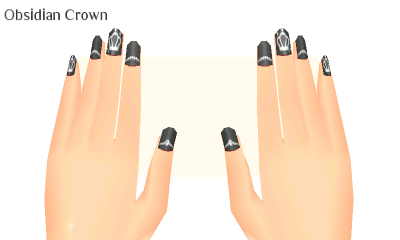
  • Obsidian Crown
  • Rebel Crown
  • Fairytale Crown
  • Royal Ball
  • Knight's Oath
  • Queen's Coronation
  • Regal Rose
  • Gothic Rose
  • Blood Rose
  • Enchanted Rose
  • Lunatic Rose
  • Magic Of The Heart
  • Labyrinth Of The Heart
  • Fantasy Of The Heart
  • Eternity Of The Heart


Monday, 22 October 2018

Amiibo - 30th Anniversary Mario

Style Boutique 3 has amiibo compatibility and unlocks special designs for your character to wear. In this game, amiibos unlock emblems and design items that are unique to the amiibo character. Certain amiibo figures unlock certain content and this guide will look at the content unlocked with the 30th Anniversary Mario amiibos.

To scan an amiibo into the game, open the phone menu and select the amiibo app. Make sure that you have the internet/online switched on. You will need either a New Nintendo 3DS/2DS with the built in NFC reader or a separate NFC Reader from Nintendo. Turn the NFC reader on if you are using the stand-alone one. Place the amiibo on the 3DS or NFC reader and the game will ask to scan it in. Once you have successfully scanned the amiibo into the game, you can either close the amiibo app or scan in more amiibos. Go to your apartment and select the Design option to access the content unlocked by the amiibo.

There are special pixel themed Mario items that you can unlock with the 30th Anniversary Mario amiibos. Both the Classic and Modern amiibos will unlock a pixel Mario emblem and three tote bag designs. The emblem features the classic pixel rendition of Mario which can be found in the older Mario games. You can add this emblem to various design items or to shopping bags.


Pixel Mario Emblem

The Pixel Mario Bag features three designs: Pixel Mario Star, Pixel Mario Plain and Pixel Mario Item. Select the bag option from the design menu and you will see the base Pixel Mario bag. Select this and the three options for the bag design will appear. You can recolour the bag and emblem designs to any colour using the design feature. 

Pixel Mario Star design

Pixel Mario Plain design

Pixel Mario Item design

The following amiibo's are compatible with Style Boutique 3/Style Savvy 4 and will unlock the Pixel Mario bag designs and emblem. 
  • 30th Anniversary Mario - Classic Colour
  • 30th Anniversary Mario - Modern Colour


Example of the Pixel Mario - Star bag design coloured

Friday, 19 October 2018

Nail Designs - Baby-Doll

There is an exciting new feature in Style Boutique 3 that allows you to paint your nails in a range of unique and colourful designs. You can get your nails done at the Beautician and any sets you have purchased can be used at your apartment. At the beautician you can also help customers pick a nail design to suit their outfit. Head to the beautician and talk to Lorelei to get a set of new nails. She will ask what type of nails you would like and the nail selection screen will appear. You can only purchase one design at a time and must re-enter the nail screen to purchase more designs. Please refer to the Nail Designs Page for all the designs available in Styling Star.

Nail designs are available for each style in the game and prices vary for each design. Here are the nail designs available in the Baby-Doll category:
  • Fairy Lace
  • Angelic Lace
  • Heavenly Lace
  • Chiffon Lace
  • Crystal Peach
  • Crystal Cyan
  • Crystal Mint
  • Crystal Lavender
  • Princess Rose
  • Aqua Rose
  • Antique Rose
  • Classic Rose